The presentation begins with three key elements: approved FAQs, service-specific checklists, and a clearly defined customer journey. It demonstrates how an assistant can use intent recognition, stage tracking, and system integrations to lead clients through the onboarding process.
The design distinguishes conversational guidance from sensitive transactions. Payment and upload processes remain within dedicated systems, while staff continue to handle professional advice, exceptions, and final document review.
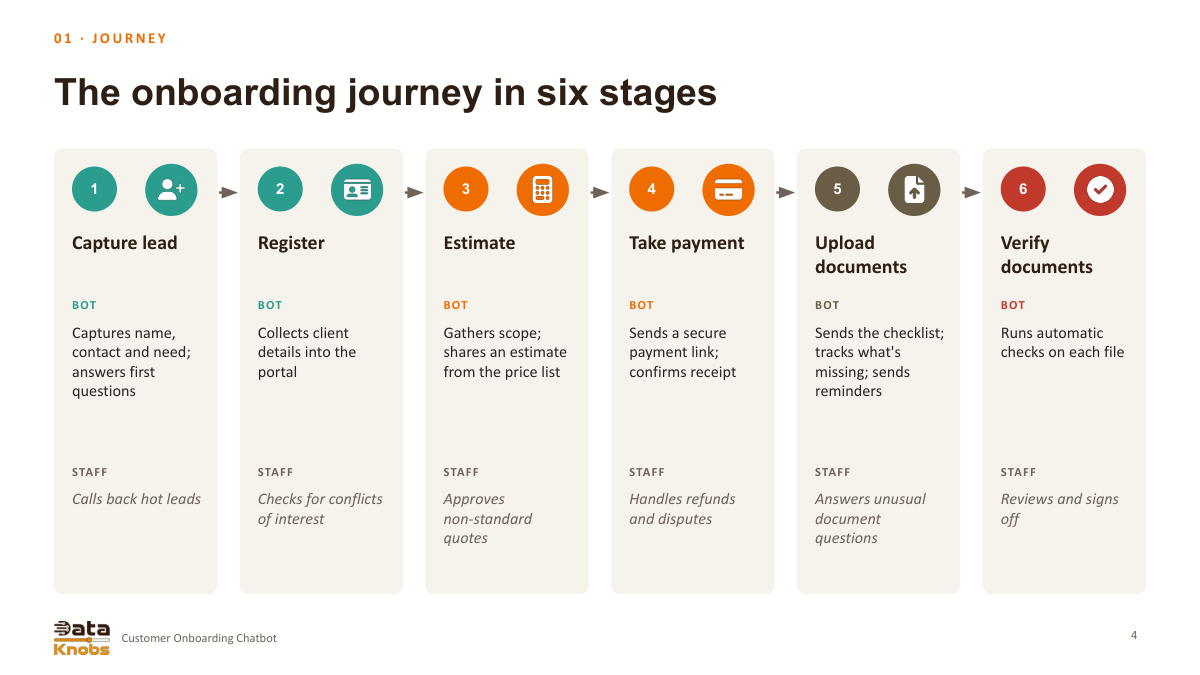
The six-stage journey
Stage
Assistant role in the proposed design
Capture lead
Record contact details and service needs
Register
Guide client details into the portal
Estimate
Prepare a scope-based estimate for confirmation
Payment
Send a secure provider link and read status
Upload
Provide checklists and track missing documents
Verify
Flag document issues for staff review and sign-off
U S E C A S E · C PA F I R M
Customer Onboarding
Chatbot
An AI assistant that takes new clients from first question to
verified documents
Prashant Dhingra · DataKnobs · Updated November 2026
Greet
Guide
Collect
Verify
Built for a small-business team, such as a CPA
firm
Customer Onboarding Chatbot
T H E O P P O R T U N I T Y
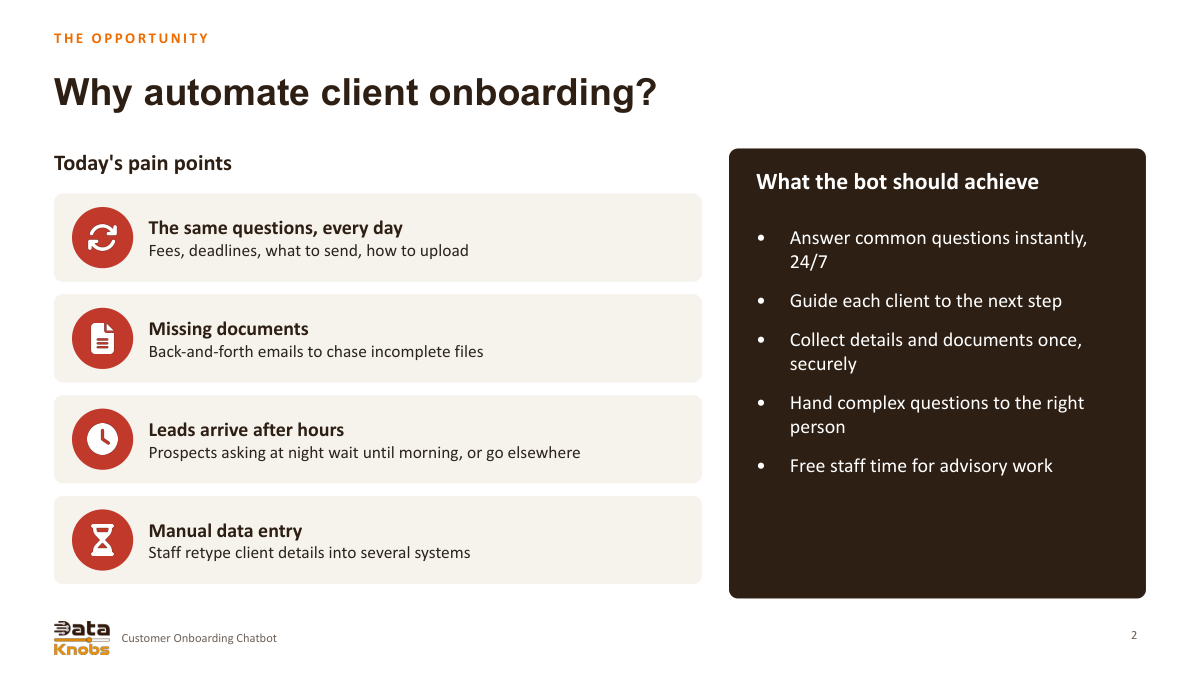
Why automate client onboarding?
Today's pain points
The same questions, every day
Fees, deadlines, what to send, how to upload
Missing documents
Back-and-forth emails to chase incomplete files
Leads arrive after hours
Prospects asking at night wait until morning, or go elsewhere
Manual data entry
Staff retype client details into several systems
What the bot should achieve
•
Answer common questions instantly,
24/7
•
Guide each client to the next step
•
Collect details and documents once,
securely
•
Hand complex questions to the right
person
•
Free staff time for advisory work
2
Customer Onboarding Chatbot
OV E R V I E W
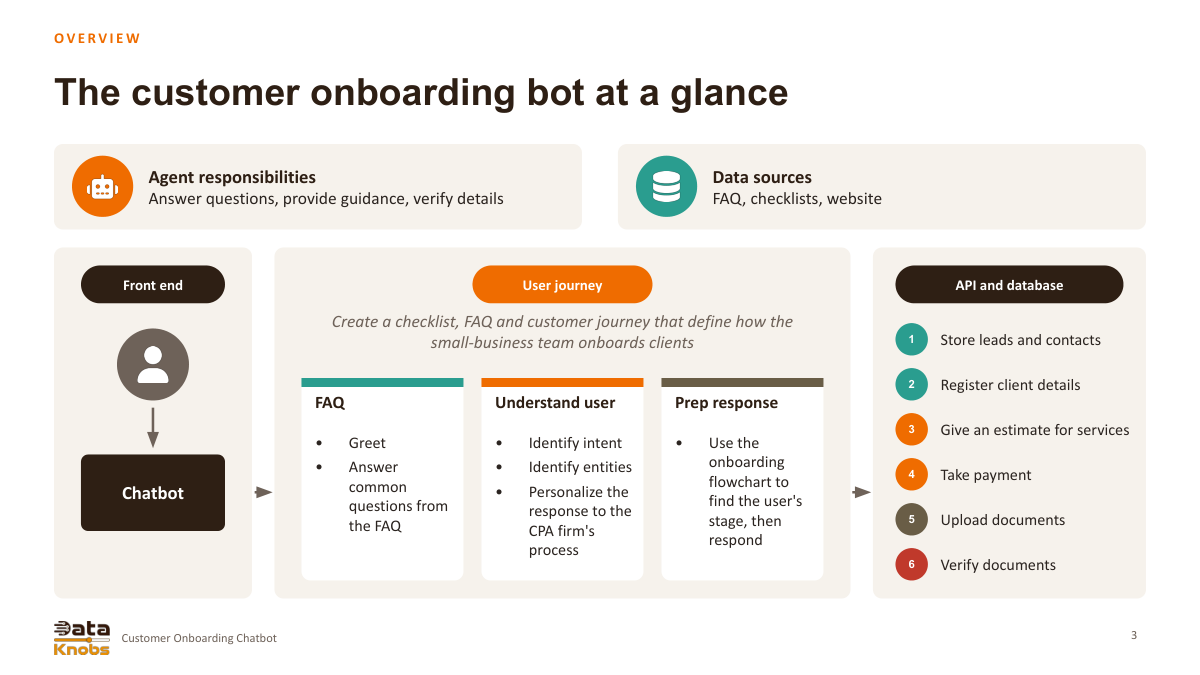
The customer onboarding bot at a glance
Agent responsibilities
Answer questions, provide guidance, verify details
Data sources
FAQ, checklists, website
Front end
Chatbot
User journey
Create a checklist, FAQ and customer journey that define how the
small-business team onboards clients
FAQ
•
Greet
•
Answer
common
questions from
the FAQ
Understand user
•
Identify intent
•
Identify entities
•
Personalize the
response to the
CPA firm's
process
Prep response
•
Use the
onboarding
flowchart to
find the user's
stage, then
respond
API and database
1
Store leads and contacts
2
Register client details
3
Give an estimate for services
4
Take payment
5
Upload documents
6
Verify documents
3
Customer Onboarding Chatbot
0 1 · J O U R N E Y
The onboarding journey in six stages
1
Capture lead
BOT
Captures name,
contact and need;
answers first
questions
STAFF
Calls back hot leads
2
Register
BOT
Collects client
details into the
portal
STAFF
Checks for conflicts
of interest
3
Estimate
BOT
Gathers scope;
shares an estimate
from the price list
STAFF
Approves
non-standard
quotes
4
Take payment
BOT
Sends a secure
payment link;
confirms receipt
STAFF
Handles refunds
and disputes
5
Upload
documents
BOT
Sends the checklist;
tracks what's
missing; sends
reminders
STAFF
Answers unusual
document
questions
6
Verify
documents
BOT
Runs automatic
checks on each file
STAFF
Reviews and signs
off
4
Customer Onboarding Chatbot
0 1 · J O U R N E Y
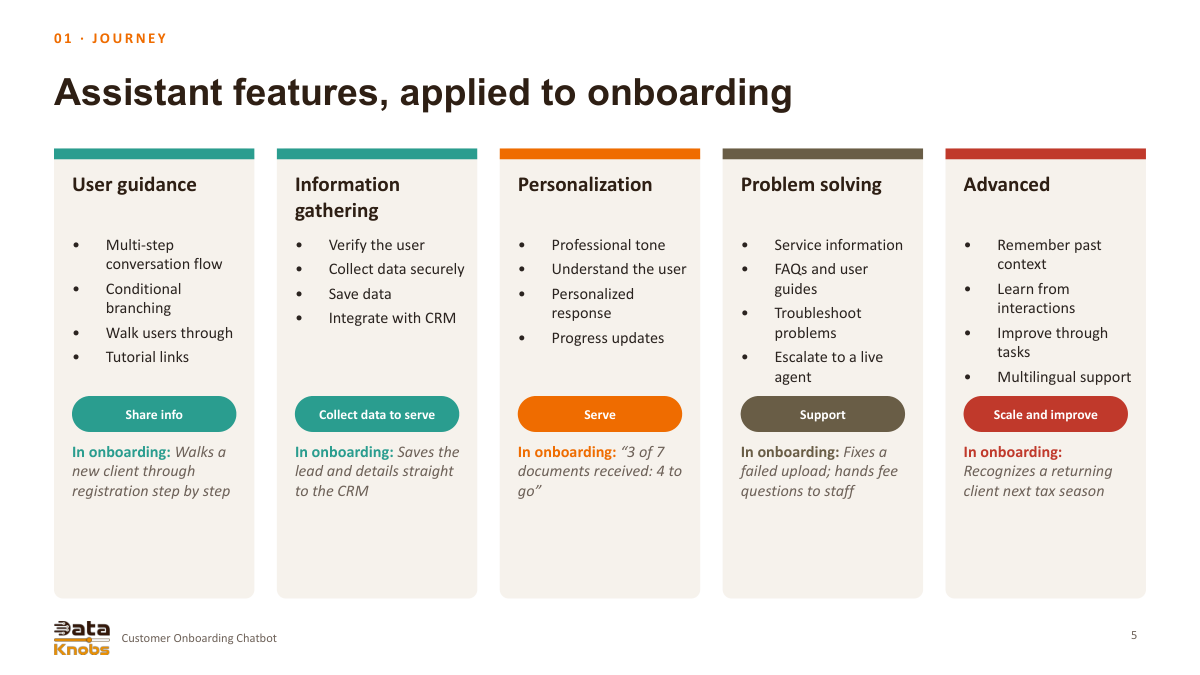
Assistant features, applied to onboarding
User guidance
•
Multi-step
conversation flow
•
Conditional
branching
•
Walk users through
•
Tutorial links
Share info
In onboarding: Walks a
new client through
registration step by step
Information
gathering
•
Verify the user
•
Collect data securely
•
Save data
•
Integrate with CRM
Collect data to serve
In onboarding: Saves the
lead and details straight
to the CRM
Personalization
•
Professional tone
•
Understand the user
•
Personalized
response
•
Progress updates
Serve
In onboarding: “3 of 7
documents received: 4 to
go”
Problem solving
•
Service information
•
FAQs and user
guides
•
Troubleshoot
problems
•
Escalate to a live
agent
Support
In onboarding: Fixes a
failed upload; hands fee
questions to staff
Advanced
•
Remember past
context
•
Learn from
interactions
•
Improve through
tasks
•
Multilingual support
Scale and improve
In onboarding:
Recognizes a returning
client next tax season
5
Customer Onboarding Chatbot
0 2 · C O N V E R S AT I O N
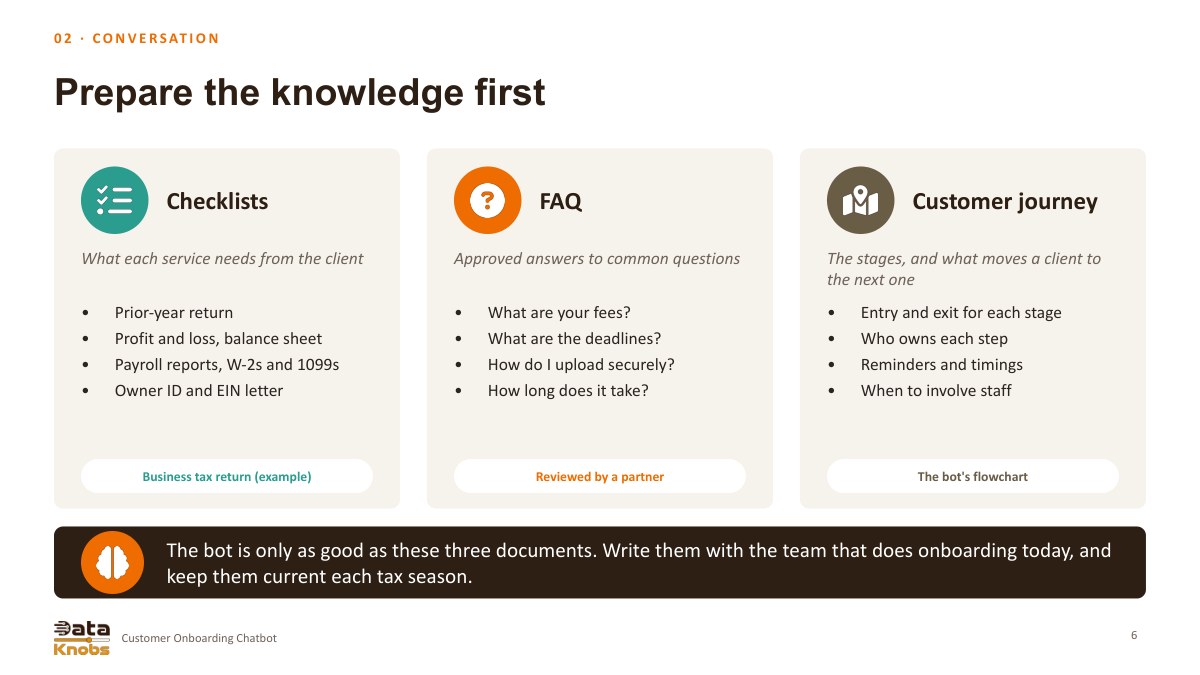
Prepare the knowledge first
Checklists
What each service needs from the client
•
Prior-year return
•
Profit and loss, balance sheet
•
Payroll reports, W-2s and 1099s
•
Owner ID and EIN letter
Business tax return (example)
FAQ
Approved answers to common questions
•
What are your fees?
•
What are the deadlines?
•
How do I upload securely?
•
How long does it take?
Reviewed by a partner
Customer journey
The stages, and what moves a client to
the next one
•
Entry and exit for each stage
•
Who owns each step
•
Reminders and timings
•
When to involve staff
The bot's flowchart
The bot is only as good as these three documents. Write them with the team that does onboarding today, and
keep them current each tax season.
6
Customer Onboarding Chatbot
0 2 · C O N V E R S AT I O N
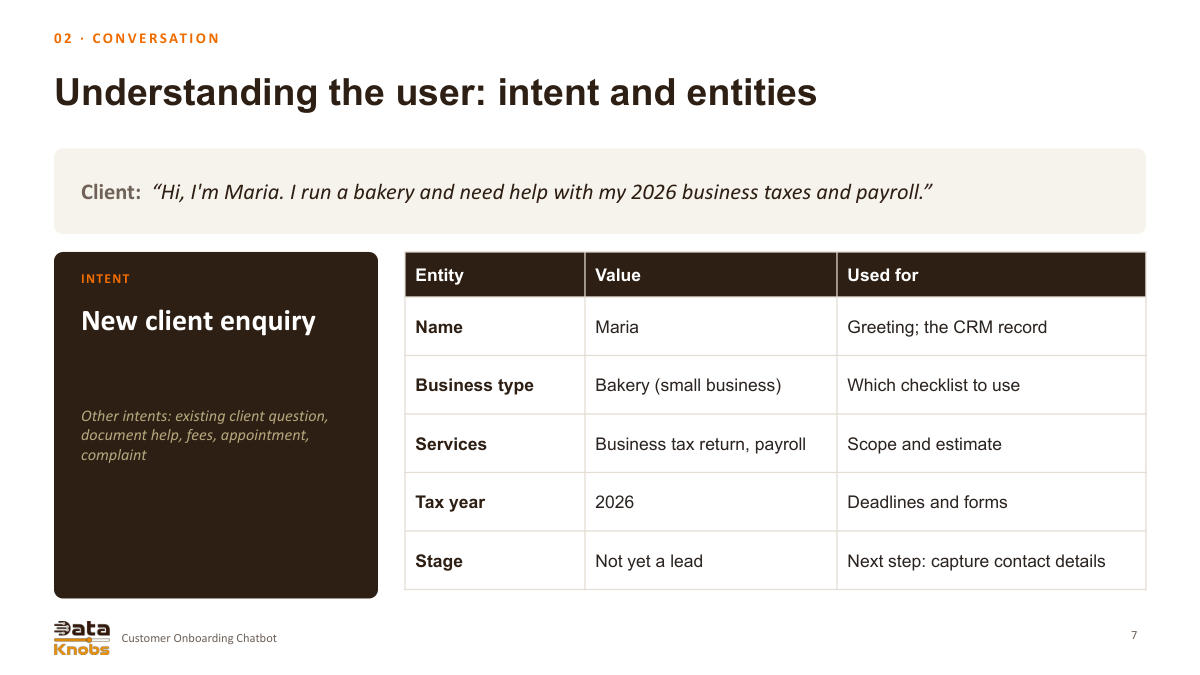
Understanding the user: intent and entities
Client: “Hi, I'm Maria. I run a bakery and need help with my 2026 business taxes and payroll.”
INTENT
New client enquiry
Other intents: existing client question,
document help, fees, appointment,
complaint
Entity
Value
Used for
Name
Maria
Greeting; the CRM record
Business type
Bakery (small business)
Which checklist to use
Services
Business tax return, payroll
Scope and estimate
Tax year
2026
Deadlines and forms
Stage
Not yet a lead
Next step: capture contact details
7
Customer Onboarding Chatbot
0 2 · C O N V E R S AT I O N
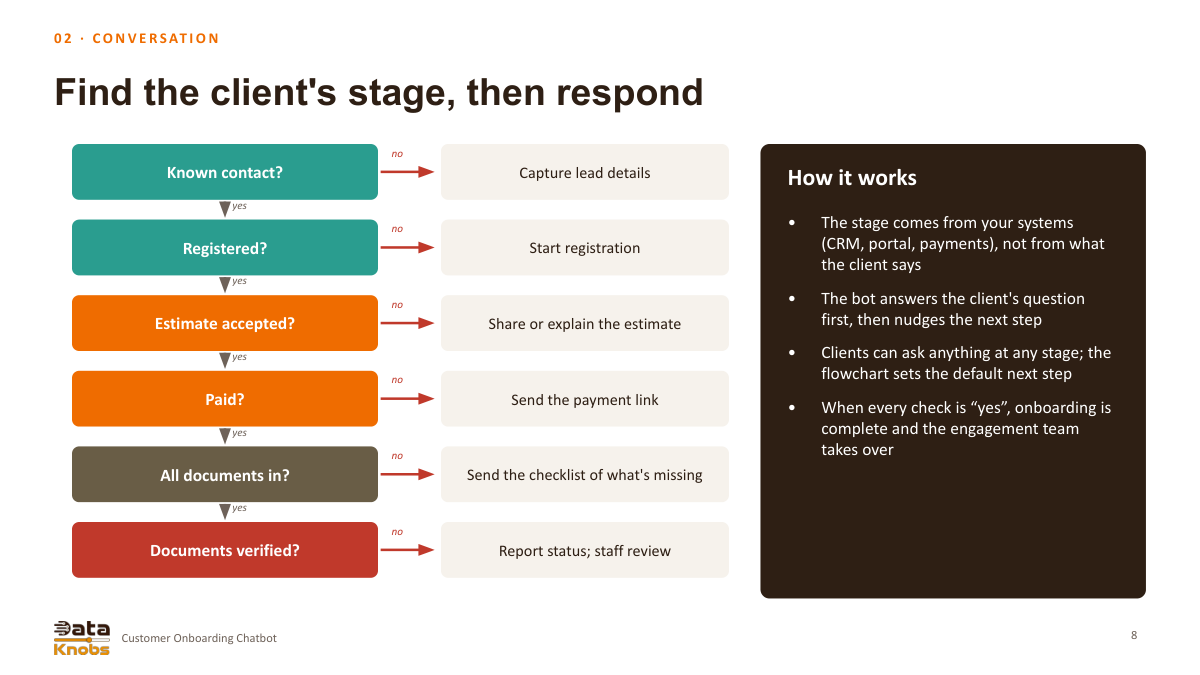
Find the client's stage, then respond
Known contact?
yes
no
Capture lead details
Registered?
yes
no
Start registration
Estimate accepted?
yes
no
Share or explain the estimate
Paid?
yes
no
Send the payment link
All documents in?
yes
no
Send the checklist of what's missing
Documents verified?
no
Report status; staff review
How it works
•
The stage comes from your systems
(CRM, portal, payments), not from what
the client says
•
The bot answers the client's question
first, then nudges the next step
•
Clients can ask anything at any stage; the
flowchart sets the default next step
•
When every check is “yes”, onboarding is
complete and the engagement team
takes over
8
Customer Onboarding Chatbot
0 2 · C O N V E R S AT I O N
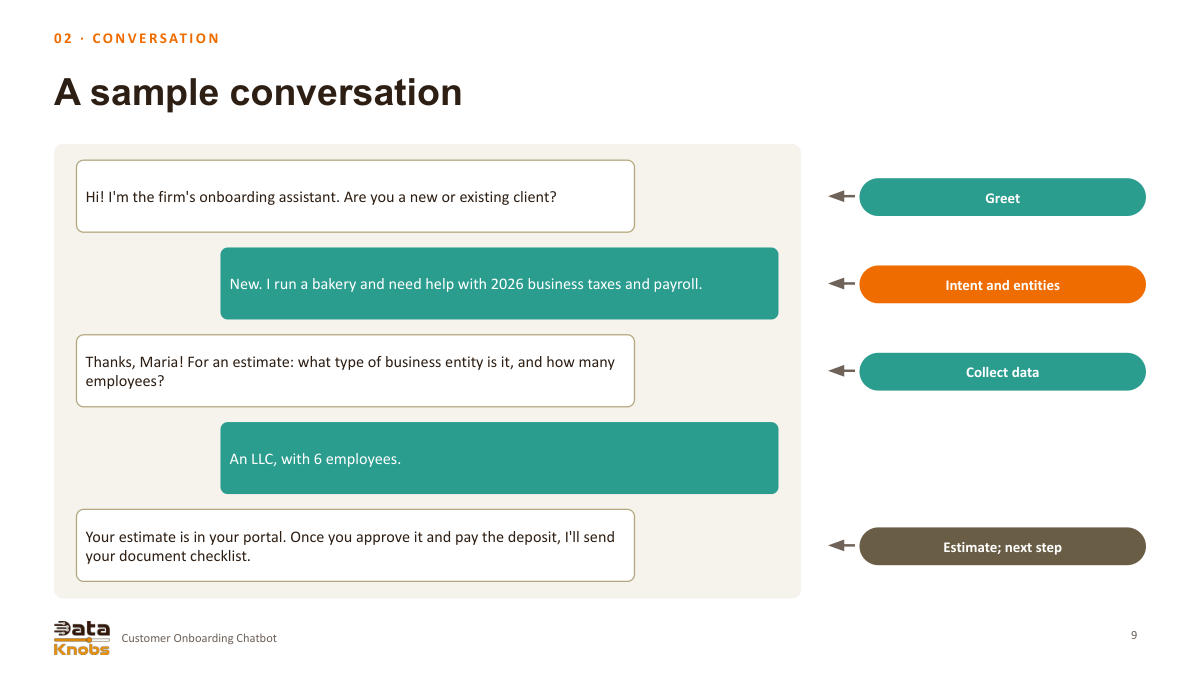
A sample conversation
Hi! I'm the firm's onboarding assistant. Are you a new or existing client?
Greet
New. I run a bakery and need help with 2026 business taxes and payroll.
Intent and entities
Thanks, Maria! For an estimate: what type of business entity is it, and how many
employees?
Collect data
An LLC, with 6 employees.
Your estimate is in your portal. Once you approve it and pay the deposit, I'll send
your document checklist.
Estimate; next step
9
Customer Onboarding Chatbot
0 3 · A R C H I T E C T U R E
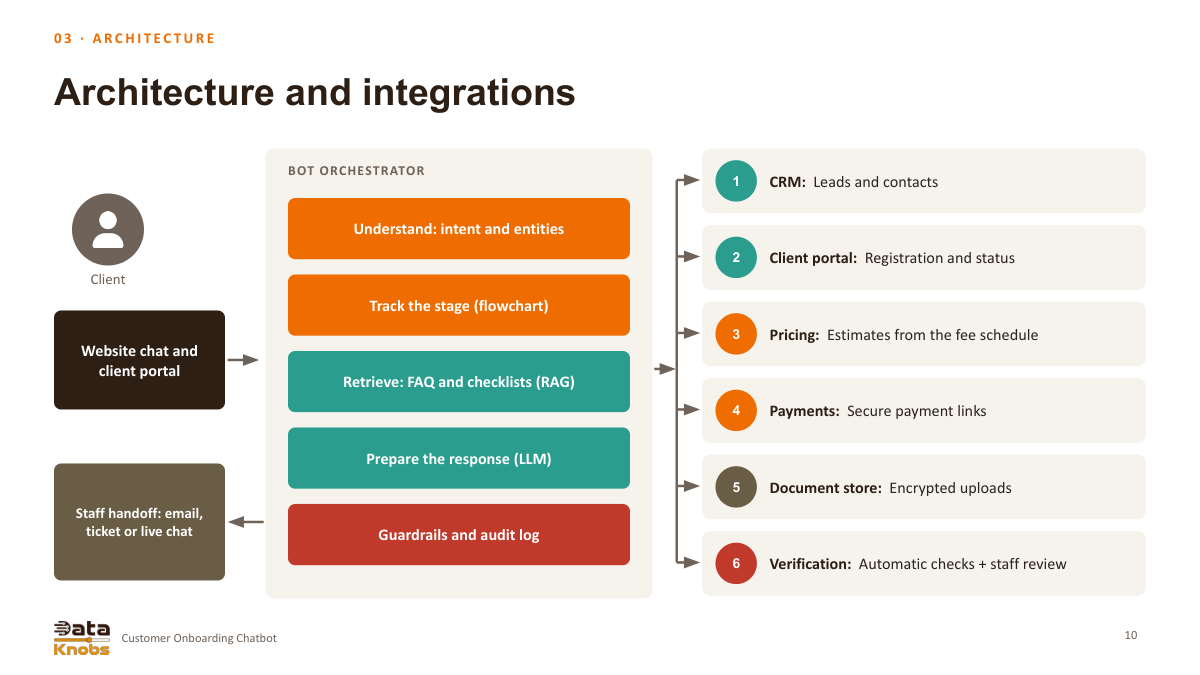
Architecture and integrations
Client
Website chat and
client portal
BOT ORCHESTRATOR
Understand: intent and entities
Track the stage (flowchart)
Retrieve: FAQ and checklists (RAG)
Prepare the response (LLM)
Guardrails and audit log
1
CRM: Leads and contacts
2
Client portal: Registration and status
3
Pricing: Estimates from the fee schedule
4
Payments: Secure payment links
5
Document store: Encrypted uploads
6
Verification: Automatic checks + staff review
Staff handoff: email,
ticket or live chat
10
Customer Onboarding Chatbot
0 3 · A R C H I T E C T U R E
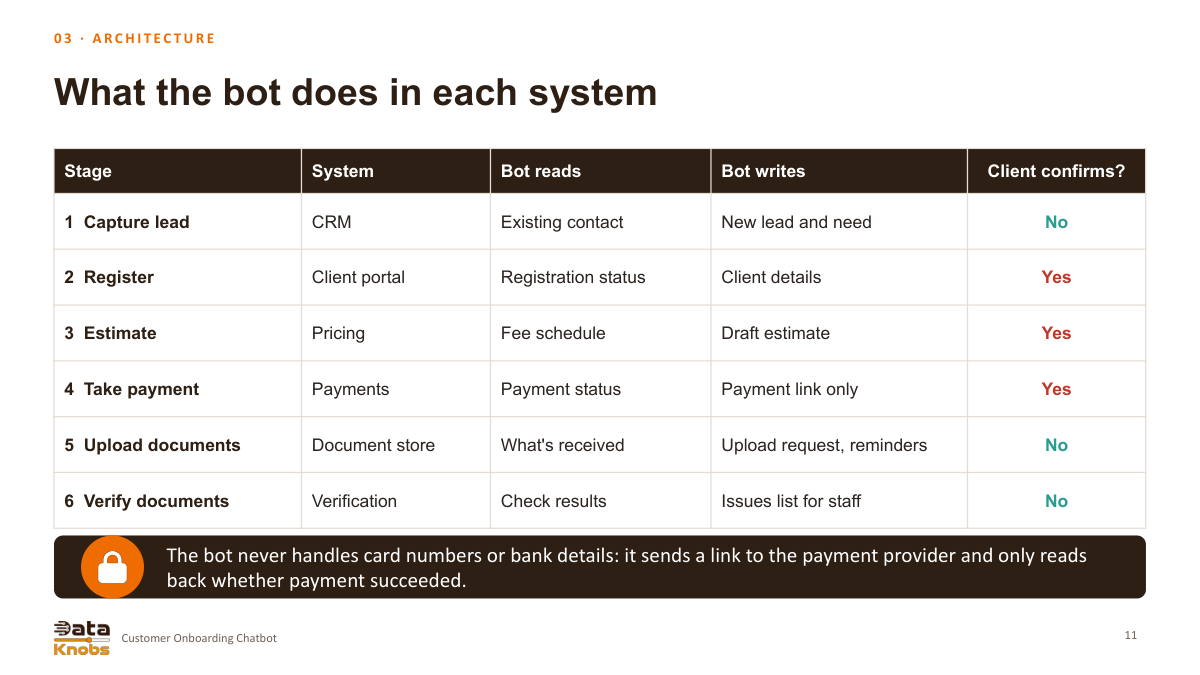
What the bot does in each system
Stage
System
Bot reads
Bot writes
Client confirms?
1 Capture lead
CRM
Existing contact
New lead and need
No
2 Register
Client portal
Registration status
Client details
Yes
3 Estimate
Pricing
Fee schedule
Draft estimate
Yes
4 Take payment
Payments
Payment status
Payment link only
Yes
5 Upload documents
Document store
What's received
Upload request, reminders
No
6 Verify documents
Verification
Check results
Issues list for staff
No
The bot never handles card numbers or bank details: it sends a link to the payment provider and only reads
back whether payment succeeded.
11
Customer Onboarding Chatbot
0 3 · A R C H I T E C T U R E
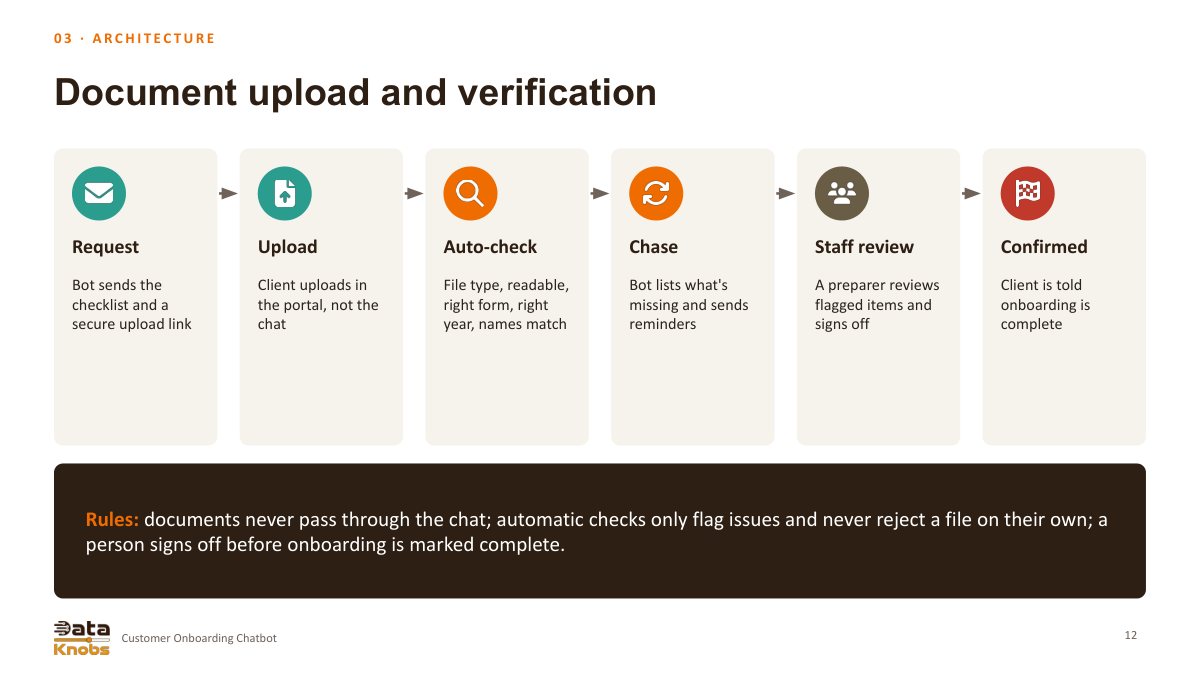
Document upload and verification
Request
Bot sends the
checklist and a
secure upload link
Upload
Client uploads in
the portal, not the
chat
Auto-check
File type, readable,
right form, right
year, names match
Chase
Bot lists what's
missing and sends
reminders
Staff review
A preparer reviews
flagged items and
signs off
Confirmed
Client is told
onboarding is
complete
Rules: documents never pass through the chat; automatic checks only flag issues and never reject a file on their own; a
person signs off before onboarding is marked complete.
12
Customer Onboarding Chatbot
0 4 · T R U S T
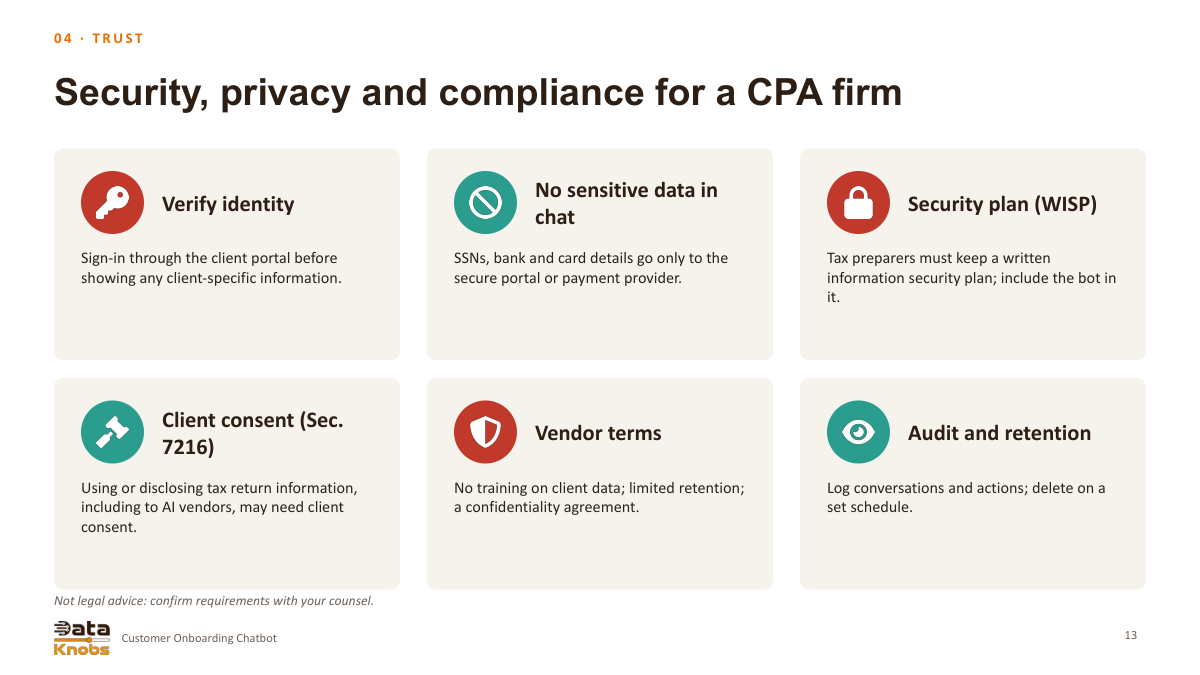
Security, privacy and compliance for a CPA firm
Verify identity
Sign-in through the client portal before
showing any client-specific information.
No sensitive data in
chat
SSNs, bank and card details go only to the
secure portal or payment provider.
Security plan (WISP)
Tax preparers must keep a written
information security plan; include the bot in
it.
Client consent (Sec.
7216)
Using or disclosing tax return information,
including to AI vendors, may need client
consent.
Vendor terms
No training on client data; limited retention;
a confidentiality agreement.
Audit and retention
Log conversations and actions; delete on a
set schedule.
Not legal advice: confirm requirements with your counsel.
13
Customer Onboarding Chatbot
0 4 · T R U S T
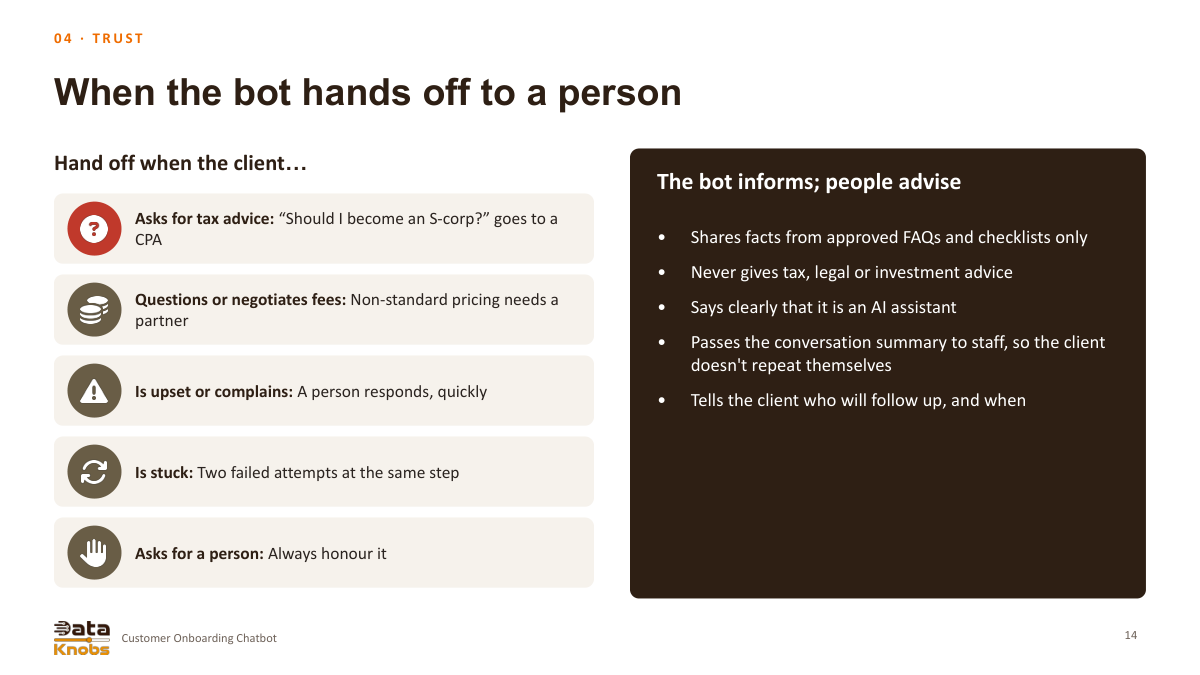
When the bot hands off to a person
Hand off when the client…
Asks for tax advice: “Should I become an S-corp?” goes to a
CPA
Questions or negotiates fees: Non-standard pricing needs a
partner
Is upset or complains: A person responds, quickly
Is stuck: Two failed attempts at the same step
Asks for a person: Always honour it
The bot informs; people advise
•
Shares facts from approved FAQs and checklists only
•
Never gives tax, legal or investment advice
•
Says clearly that it is an AI assistant
•
Passes the conversation summary to staff, so the client
doesn't repeat themselves
•
Tells the client who will follow up, and when
14
Customer Onboarding Chatbot
0 5 · R E S U LT S
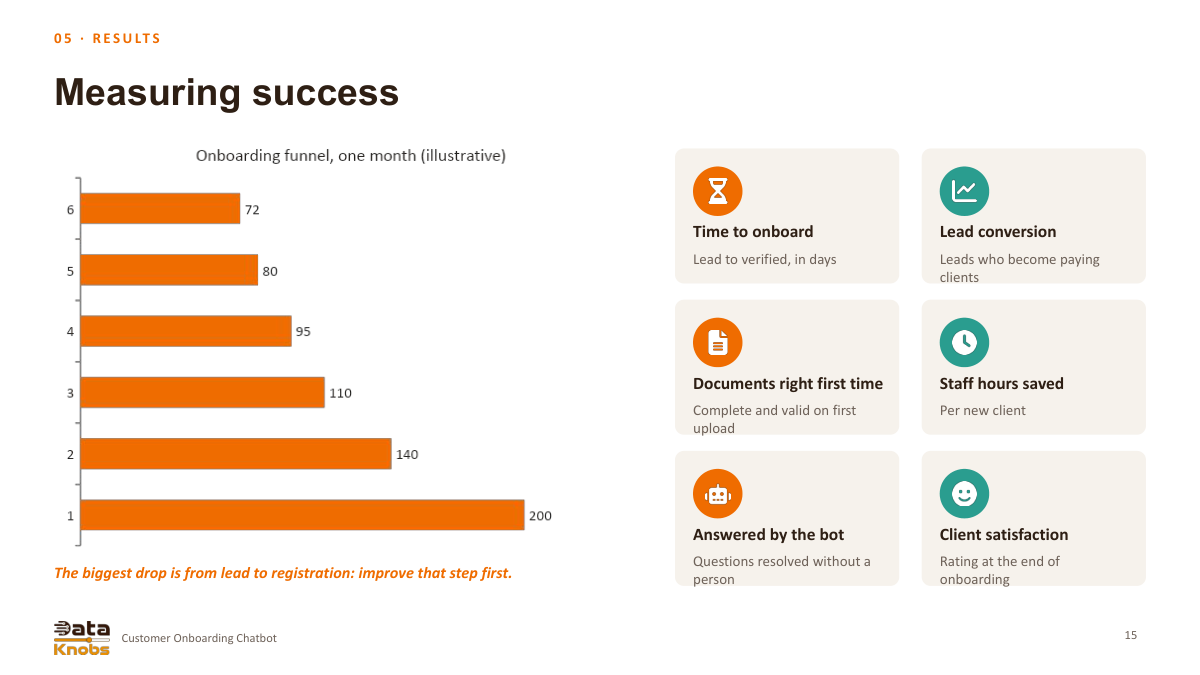
Measuring success
The biggest drop is from lead to registration: improve that step first.
Time to onboard
Lead to verified, in days
Lead conversion
Leads who become paying
clients
Documents right first time
Complete and valid on first
upload
Staff hours saved
Per new client
Answered by the bot
Questions resolved without a
person
Client satisfaction
Rating at the end of
onboarding
15
Customer Onboarding Chatbot
0 5 · R E S U LT S
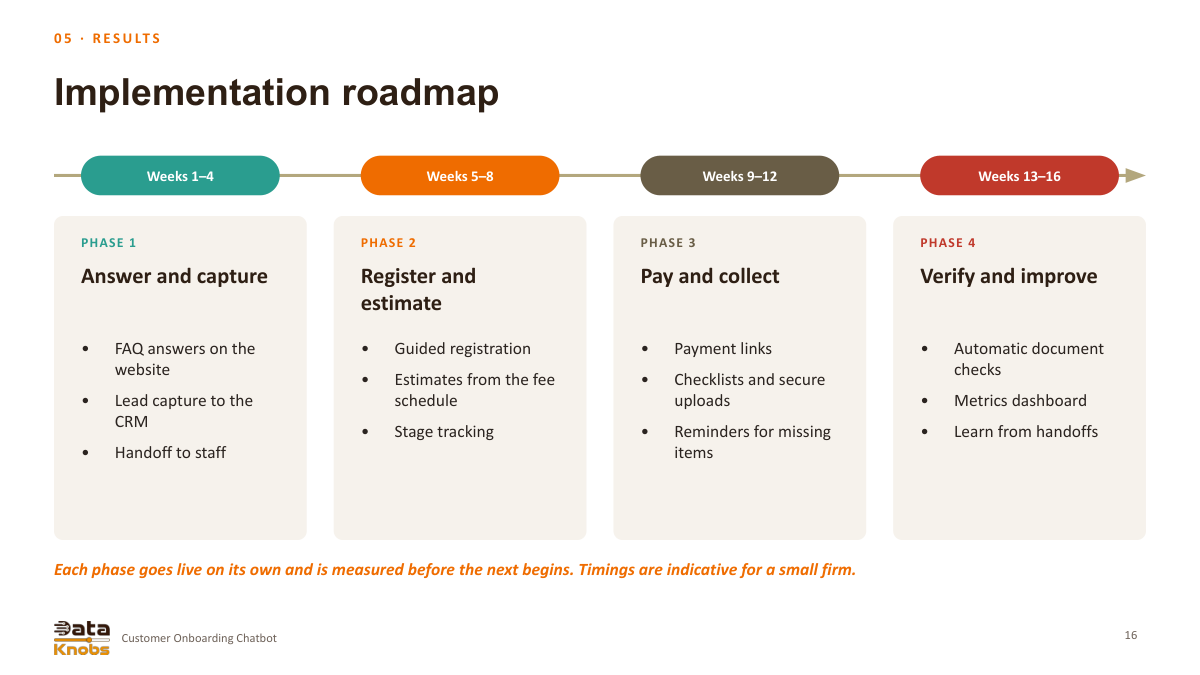
Implementation roadmap
Weeks 1–4
PHASE 1
Answer and capture
•
FAQ answers on the
website
•
Lead capture to the
CRM
•
Handoff to staff
Weeks 5–8
PHASE 2
Register and
estimate
•
Guided registration
•
Estimates from the fee
schedule
•
Stage tracking
Weeks 9–12
PHASE 3
Pay and collect
•
Payment links
•
Checklists and secure
uploads
•
Reminders for missing
items
Weeks 13–16
PHASE 4
Verify and improve
•
Automatic document
checks
•
Metrics dashboard
•
Learn from handoffs
Each phase goes live on its own and is measured before the next begins. Timings are indicative for a small firm.
16
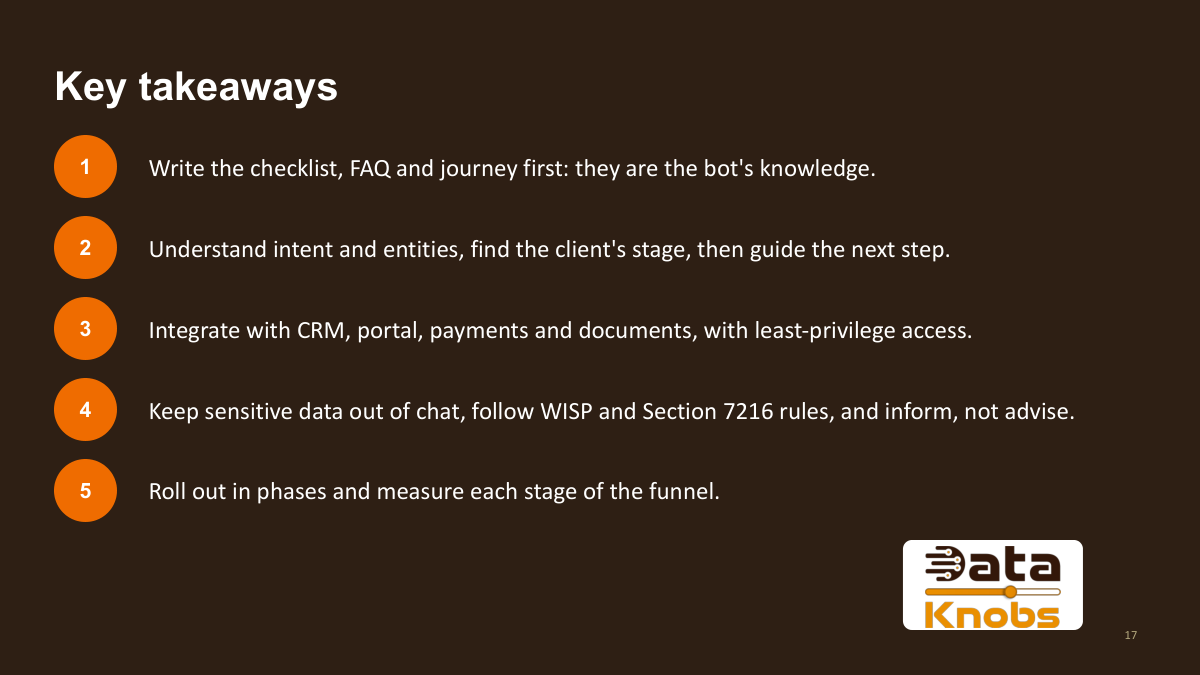
Key takeaways
1
Write the checklist, FAQ and journey first: they are the bot's knowledge.
2
Understand intent and entities, find the client's stage, then guide the next step.
3
Integrate with CRM, portal, payments and documents, with least-privilege access.
4
Keep sensitive data out of chat, follow WISP and Section 7216 rules, and inform, not advise.
5
Roll out in phases and measure each stage of the funnel.
17
The presentation proceeds through lead capture, registration, estimate, payment, document upload, and document verification.
How does the assistant choose the next step?
It recognizes intent and pertinent information, verifies the client’s status in the CRM, portal, and payment platforms, addresses the immediate inquiry, and directs the following onboarding step.
Where are payments and documents handled?
In the proposed design, payments are made via a payment-provider link, and documents are submitted through a secure portal. The chatbot retrieves status updates instead of gathering card information or accepting documents within the chat.
Who makes the final document-verification decision?
Automatic checks identify issues; staff then review and approve before onboarding is considered complete. The presentation does not suggest automatic file rejection by the bot.
When should the assistant hand off?
The deck directs requests for professional advice, unusual fees, complaints, recurring issues, and explicit requests for a specific person to staff.
How is success measured?
Proposed metrics encompass onboarding duration, lead conversion rates, initial document accuracy, staff time saved, issue resolution, and client satisfaction.
 1. Customer Onboarding Chatbot
 2. Why Automate Onboarding?
 3. The Bot at a Glance
 4. Six-Stage Onboarding Journey
 5. Assistant Features
 6. Prepare the Knowledge
 7. Intent and Entities
 8. Find the Client’s Stage
 9. A Sample Conversation
 10. Architecture and Integrations
 11. System Reads and Writes
 12. Upload and Verification
 13. Security and Privacy in the Source Deck
 14. Human Handoff
 15. Measuring Success
 16. Implementation Roadmap
 17. Key Takeaways