
BigQuery vs Redshift vs Snowflake vs Databricks
Complete Feature Comparison & Selection Guide
The modern data cloud landscape offers four major platforms, each with distinct architectures, strengths, and ideal use cases. Choosing the right platform requires understanding your organization's specific needs, existing infrastructure, and long-term strategy. This comprehensive guide provides the detailed analysis needed to make an informed decision.
Cloud Provider: Existing infrastructure and ecosystem preferences matter. Workload Type: Analytics, ML, or data engineering focus. Scale & Concurrency: Number of concurrent users and query complexity. Cost Model: Predictable vs. variable costs. Data Types: Structured only vs. multi-modal data. Maintenance Tolerance: Fully-managed vs. hands-on preference.
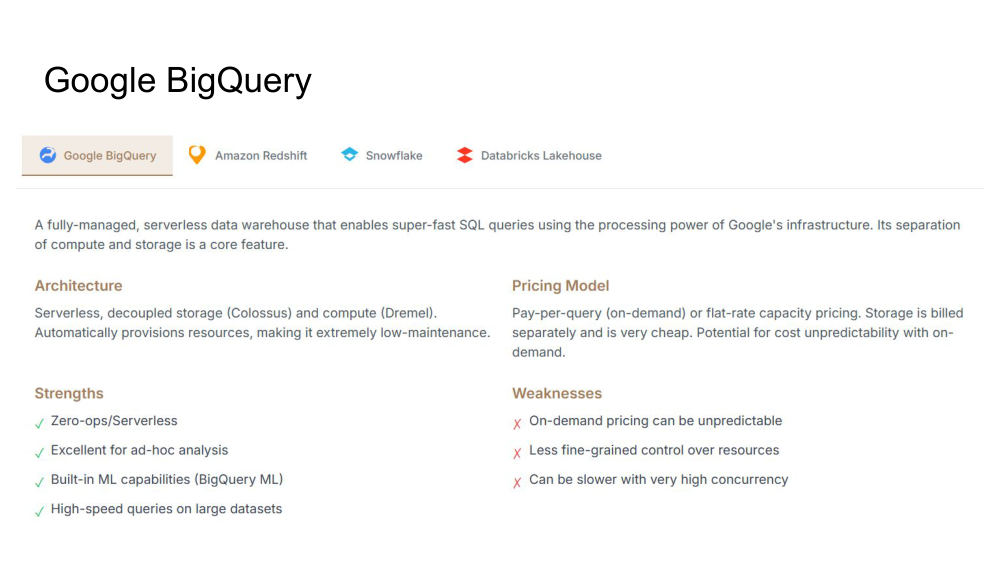
BigQuery is a fully-managed, serverless data warehouse that enables super-fast SQL queries using Google's massive infrastructure. Its separation of compute and storage is a core architectural feature that provides flexibility and cost-effectiveness.
Serverless, decoupled storage (Colossus) and compute (Dremel). Automatically provisions resources, making it extremely low-maintenance.
Pay-per-query (on-demand) or flat-rate capacity pricing. Storage is billed separately and is very cheap. Potential for cost unpredictability with on-demand.
Perfect for data analysts exploring data without knowing in advance how many queries will be needed. No cluster sizing required.
Excellent for business intelligence where you need fast queries but predictable concurrency. Easy integration with BI tools.
Best fit for organizations already using Google Cloud services::integrates seamlessly with BigQuery ML, Vertex AI, and other GCP services.
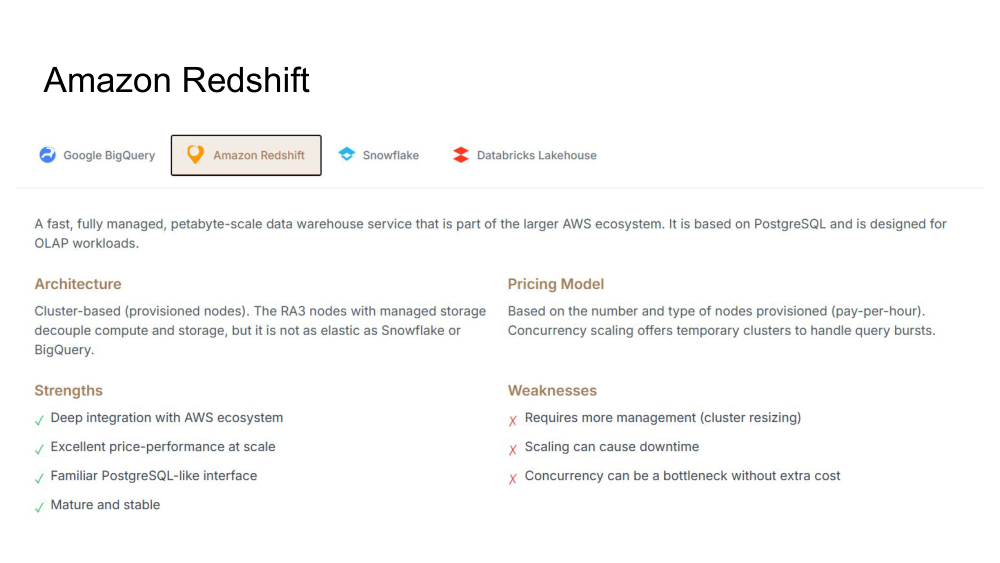
A fast, fully-managed, petabyte-scale data warehouse service based on PostgreSQL designed for OLAP workloads. The RA3 architecture with managed storage decouples compute and storage, but it's not as elastic as Snowflake or BigQuery.
Cluster-based (provisioned nodes). RA3 nodes with managed storage decouple compute and storage, but it's not as elastic as Snowflake or BigQuery.
Based on number and type of nodes provisioned (pay-per-hour). Concurrency scaling offers temporary clusters to handle query bursts.
Deep integration with AWS services makes this ideal for organizations already committed to the AWS ecosystem.
Excellent price-performance when you can predict your compute needs and right-size your cluster appropriately.
Proven platform with mature tooling and lots of operational experience in the community.
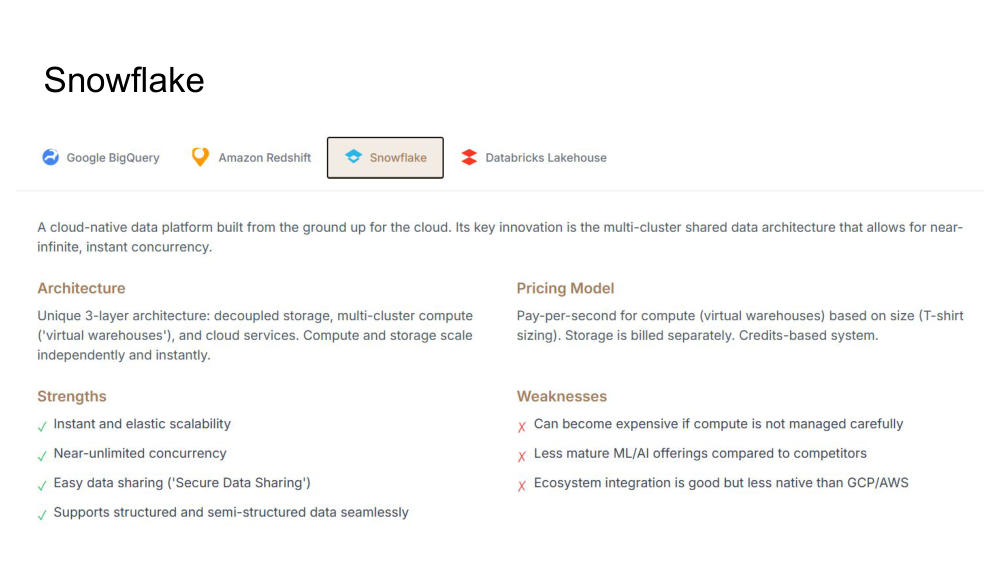
A cloud-native data platform built from the ground up for the cloud. Its key innovation is the multi-cluster shared data architecture that allows near-infinite, instant concurrency. Snowflake's unique architecture sets it apart from competitors.
Unique 3-layer architecture: decoupled storage, multi-cluster compute ('virtual warehouses'), and cloud services. Compute and storage scale independently and instantly.
Pay-per-second for compute (virtual warehouses) based on size (T-shirt sizing). Storage is billed separately. Credits-based system.
Organizations with many concurrent users or high-variability workloads benefit from Snowflake's instant scaling.
Secure Data Sharing makes Snowflake ideal for organizations that need to share data across teams or with external partners.
Available on AWS, Azure, and GCP, making it ideal for organizations wanting cloud provider flexibility.
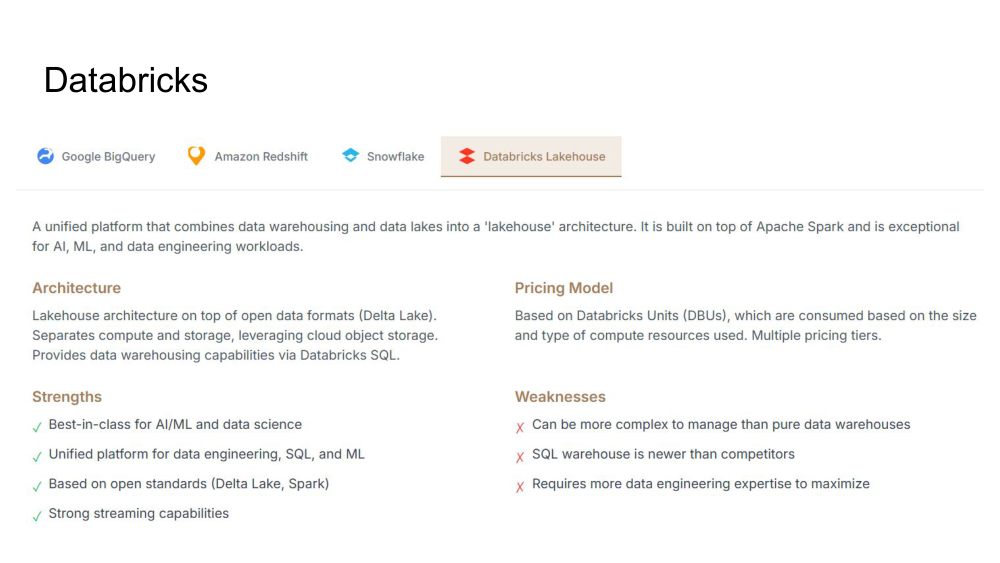
A unified platform that combines data warehousing and data lakes into a 'lakehouse' architecture. Built on top of Apache Spark and exceptional for AI, ML, and data engineering workloads. Most complex to operate but most powerful for advanced use cases.
Lakehouse architecture on top of open data formats (Delta Lake). Separates compute and storage, leveraging cloud object storage. Provides data warehousing capabilities via Databricks SQL.
Based on Databricks Units (DBUs), consumed based on size and type of compute resources used. Multiple pricing tiers for different workloads.
Unmatched capabilities for machine learning with integrated notebooks, MLflow, and tight Spark integration.
Ideal for organizations building complex data pipelines and transformations with Apache Spark.
Organizations wanting one platform for SQL analytics, ML, and data engineering without switching tools.
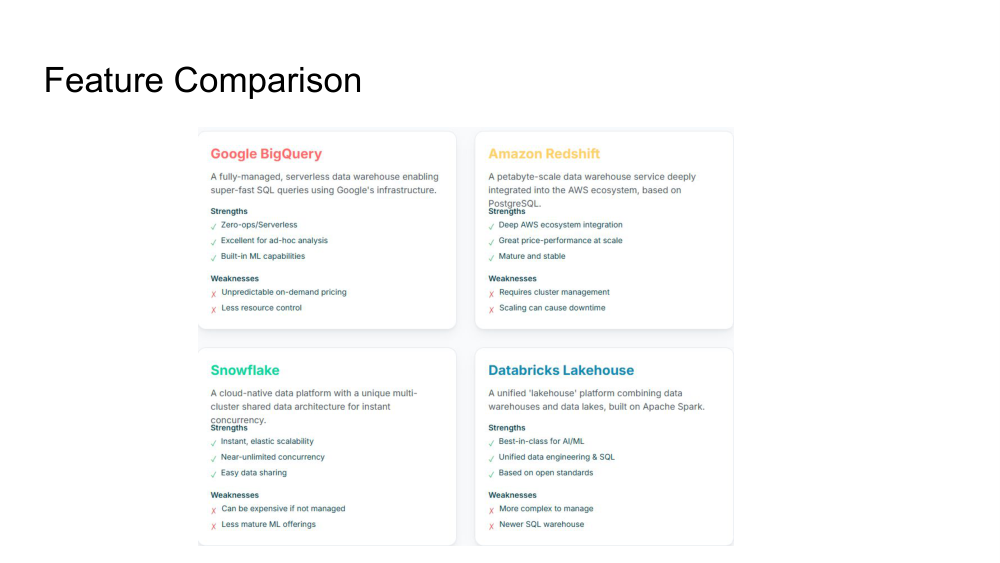
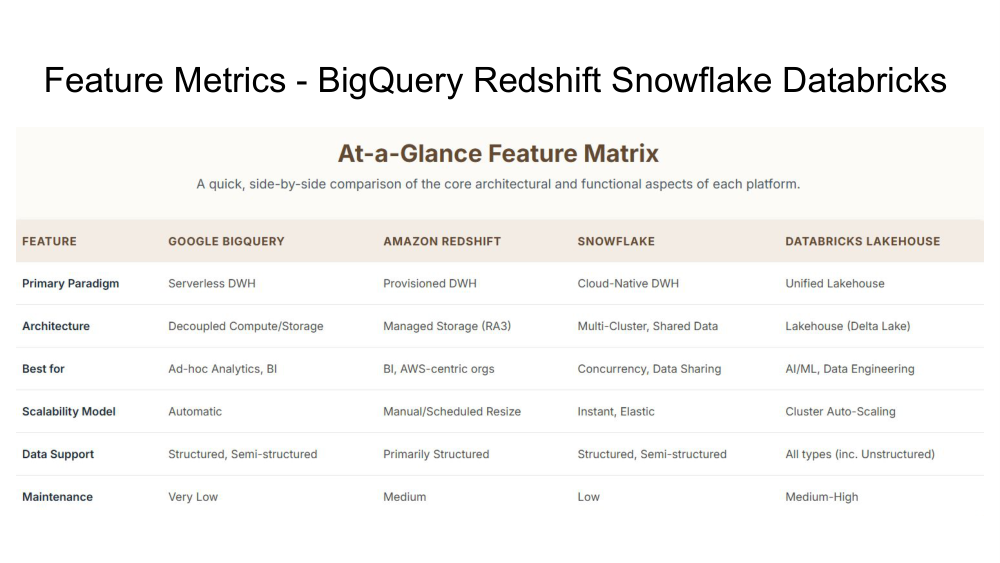
This detailed feature comparison provides side-by-side analysis of each platform across key decision dimensions.
Choosing the right data platform requires thoughtful analysis of your specific needs. Use this framework to navigate the decision.
Google Cloud: BigQuery is the natural choice. AWS: Redshift has deep integration, but Snowflake and Databricks are also strong choices. Azure: Snowflake is best option for multi-cloud flexibility, though Databricks works well too. Multi-cloud: Snowflake is the only pure multi-cloud option.
BI & Analytics: BigQuery or Redshift excel. AI/ML & Data Science: Databricks is unmatched. Ad-hoc Analysis: BigQuery is ideal. High-Concurrency Apps: Snowflake's instant scaling handles this best. Mixed (SQL + ML): Databricks or Snowflake.
Primarily structured: Any option works. Mix of structured/unstructured: Snowflake or Databricks. Complex multi-modal data: Databricks is your best bet. Large-scale tabular: BigQuery or Redshift excel.
Minimal ops wanted: BigQuery (truly serverless). Willing to manage: Redshift or Snowflake. Hands-on fine control: Databricks. Cost optimization important: Snowflake (careful management) or Redshift (right-sizing).
Predictable, low concurrency: Redshift (right-size cluster). Variable concurrency: Snowflake (instant scaling). Many concurrent users: Snowflake's instant scaling shines. Complex analytics jobs: BigQuery or Databricks.
Fixed budget: Redshift (capacity pricing). Variable cost OK: BigQuery or Snowflake. Cost optimization important: Redshift at scale. Budget not primary concern: Databricks (powerful but can be expensive).
You want true serverless with zero ops, you're on Google Cloud, you need fast ad-hoc analytics, or you want simple ML capabilities. Best for: Analysts, BI teams, ad-hoc users.
You're AWS-first and want deep ecosystem integration, you can right-size your cluster, you need cost-predictability, or you have mature BI workloads. Best for: AWS organizations, BI teams.
You need instant scaling for variable workloads, high concurrency is important, you want multi-cloud flexibility, or you need easy data sharing. Best for: Large organizations, data sharing, variable workloads.
You're building AI/ML, you need unified data engineering + analytics + ML, you have complex Spark workloads, or you want open standards. Best for: Data scientists, ML engineers, data engineers.
There is no universally "best" data platform. Each has distinct strengths optimized for different use cases. The right choice depends entirely on your specific needs, existing infrastructure, and organizational capabilities.
Key factors to weigh: Cloud provider lock-in vs. flexibility, operational complexity vs. hands-on control, fixed vs. variable costs, workload specialization vs. generality, and team expertise. Take time to understand these trade-offs rather than choosing based on hype or vendor relationships.
The investment in choosing correctly pays dividends for years. A platform choice made at the beginning of your data journey will influence architecture, tooling, and team expertise for years to come. Invest time in understanding your requirements and evaluating options carefully. The evaluation frameworks in this guide should help clarify which platform is the best fit for your specific situation.