PostgreSQL + pgvector
Keep vectors beside relational data and combine similarity search with SQL, transactions, joins, and metadata filters.
Best first test: PostgreSQL-centric applications.pgvector, MongoDB Vector Search, Chroma, and Pinecone can all support semantic search and RAG. The better question is where vectors belong in your system, what retrieval quality and latency you need, how selective your filters are, and who should own the search infrastructure.
There is no universally best vector database. The strongest default is often the option that minimizes a new operational boundary while still meeting retrieval-quality and latency targets.
Keep vectors beside relational data and combine similarity search with SQL, transactions, joins, and metadata filters.
Best first test: PostgreSQL-centric applications.Keep operational JSON documents, metadata, and vectors in Atlas, with dedicated Search Nodes available for workload isolation.
Best first test: MongoDB-centric applications.Use the open-source API for local/self-hosted development or Chroma Cloud when you want a distributed serverless operating model.
Best first test: developer-first retrieval workflows.Use a purpose-built managed retrieval layer with serverless scaling and support for dense, sparse, full-text, filtering, and hybrid patterns.
Best first test: vector-first managed production search.The old page treated Chroma primarily as a single-node prototype database and Pinecone as a simple managed dense-vector service. That framing is now incomplete. Chroma Cloud is distributed and serverless, while Pinecone's current platform spans dense, sparse, full-text, metadata filtering and serverless deployment options. The comparison below evaluates the current deployment models rather than freezing each product at an earlier stage.
Integrated approaches reduce synchronization boundaries. Dedicated approaches can isolate retrieval scaling and operations. Neither architecture is inherently superior.
Vectors live with the operational or analytical records your application already uses.
Vector retrieval is operated as a distinct service with its own index, scaling model, and API.
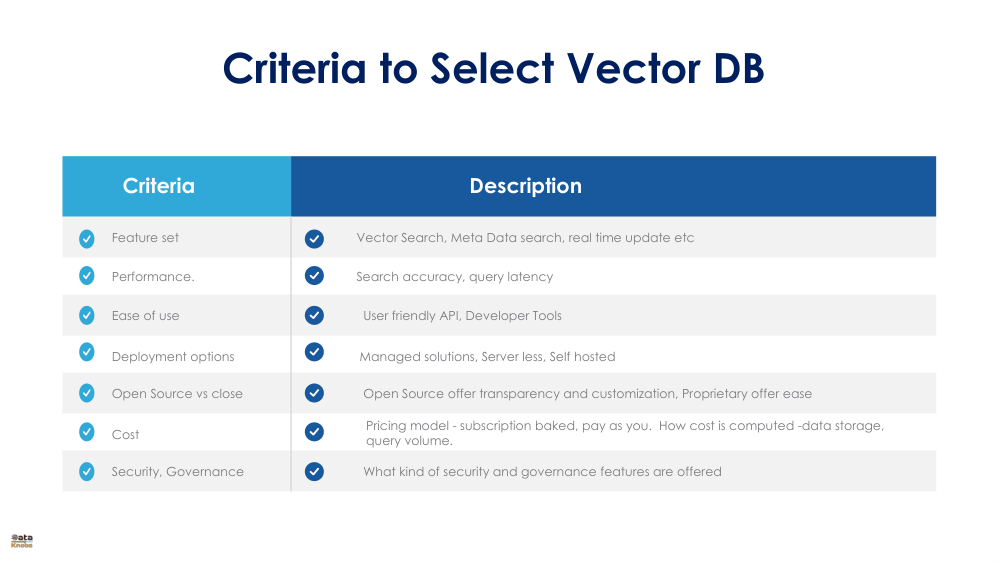
Performance depends on data shape, index parameters, filter selectivity, query mix, concurrency, region, hardware, and freshness requirements. Treat labels such as “fast” as hypotheses to test.
| Decision axis | pgvector | MongoDB Vector Search | Chroma | Pinecone |
|---|---|---|---|---|
| System boundary | PostgreSQL extension | Atlas database + search layer | Open-source Chroma or Chroma Cloud | Managed retrieval service |
| Best contextual fit | Relational apps already on Postgres | Document apps already on Atlas | Developer-first retrieval; local-to-cloud path | Vector-first managed production retrieval |
| ANN / indexing | HNSW, IVFFlat; exact search also available | Atlas Vector Search indexes and dedicated Search Nodes | Deployment-dependent; cloud uses distributed indexing | Managed serverless indexes; current product also supports sparse/full-text retrieval |
| Metadata / structured filters | Full SQL + relational filters | Document filters in vector search workflow | Metadata filtering supported; test complex filter patterns | Metadata filtering supported; test selectivity and namespace design |
| Data consistency boundary | Vectors can live transactionally with source rows | Vectors can live with source documents | Depends on whether Chroma is source-of-truth or synchronized | Usually synchronized from another source system |
| Independent search scaling | Depends on PostgreSQL deployment/topology | Dedicated Search Nodes can isolate search | Chroma Cloud is distributed/serverless | Serverless managed scaling |
| Operations burden | Low if Postgres is already well operated; higher for heavy ANN tuning | Managed Atlas operations; search nodes add a separate cost surface | High for self-hosted; lower with Chroma Cloud | Low infrastructure burden; service/API dependency remains |
| Portability | Open source; SQL-centric | MongoDB data model is portable; Atlas search features are service-specific | Open-source API plus managed cloud option | Managed proprietary service; abstraction layer can reduce application coupling |
| Cost shape | Database compute/storage + engineering | Atlas cluster/search-node consumption + engineering | Self-host infrastructure or cloud usage + engineering | Managed storage/read/write usage + engineering |
| Do not choose because… | “It is already there” without testing filtered ANN under load | “One database” without understanding Search Node economics | “It is only for prototypes” : that is now stale | “It is always fastest” : benchmark your workload |
A vector-search benchmark is useful only when it resembles the production query distribution. A synthetic nearest-neighbor test with no filters can select the wrong architecture for a real RAG application.
These compact examples show the common shape: write a record with a vector, then run similarity search with metadata filtering. Exact SDK syntax can change, so pin and test the vendor version you deploy.
-- Vector search plus structured filtering
SELECT id, title,
       embedding <=> $1 AS distance
FROM items
WHERE tenant_id = $2
  AND category = 'electronics'
ORDER BY embedding <=> $1
LIMIT 10;

-- Example ANN index
CREATE INDEX items_embedding_hnsw
ON items USING hnsw
(embedding vector_cosine_ops);db.items.aggregate([
{ $vectorSearch: {
index: "vector_index",
path: "embedding",
queryVector: queryVector,
filter: {
tenant_id: tenantId,
category: "electronics"
},
numCandidates: 100,
limit: 10
}},
{ $project: {
title: 1,
score: { $meta: "vectorSearchScore" }
}}
])# collection is an initialized Chroma collection
collection.add(
ids=["1"],
embeddings=[embedding],
metadatas=[{
"tenant_id": "acme",
"category": "electronics"
}]
)
results = collection.query(
query_embeddings=[query_embedding],
where={"tenant_id": "acme"},
n_results=10
)# index is an initialized Pinecone index
index.upsert(vectors=[{
"id": "1",
"values": embedding,
"metadata": {
"tenant_id": "acme",
"category": "electronics"
}
}])
results = index.query(
vector=query_embedding,
filter={"tenant_id": {"$eq": "acme"}},
top_k=10,
include_metadata=True
)Vector-search economics are shaped by infrastructure, engineering ownership, data duplication, migration risk, security review, and the cost of missing your retrieval SLO.
Keeping embeddings with source records simplifies consistency. A separate retrieval service can simplify independent scaling. Decide which boundary creates less organizational friction.
Open-source software is not operationally free, and managed services are not automatically expensive. Compare fully loaded cost at expected and 10× workload.
Vendor-specific APIs and managed features can accelerate delivery. Treat portability as an explicit requirement and test export/rebuild paths before they are urgent.
Lower latency with worse recall can degrade RAG answers. A slower index with materially better retrieval may be the better business system.
Review tenancy, network isolation, encryption, region, audit, retention, deletion and backup behavior: not only search features.
Keep source records and embedding provenance independent enough to rebuild an index. A vector index should not become the only copy of business-critical data.
This is a starting hypothesis, not a substitute for testing.
When PostgreSQL is already a trusted system of record and vector search is one feature inside a relational application.
Key proof: filtered ANN + concurrency.When your application already lives on Atlas and documents, metadata and embeddings naturally share one model.
Key proof: Search Node sizing + cost.When developer ergonomics and an open-source API matter, with a path from local development to a managed distributed deployment.
Key proof: target deployment mode + production SLO.When retrieval is a primary managed workload and you prefer to separate vector-search scaling from the operational database.
Key proof: quality/latency/cost at query mix.Capabilities and pricing models evolve. These sources are useful starting points when turning this decision guide into a production architecture.
Not necessarily. If vectors belong with relational or document data you already operate, integrated search can reduce synchronization and operational complexity. A dedicated service becomes more attractive when retrieval is a primary workload, independent scaling matters, or managed search operations are worth the additional platform dependency.
Yes. pgvector supports exact nearest-neighbor search plus HNSW and IVFFlat approximate indexes. Production suitability depends on dataset size, filter selectivity, concurrency, latency targets, PostgreSQL topology, and how much tuning your team wants to own.
No. Open-source Chroma is still useful for local and self-hosted development, while Chroma Cloud is a distributed serverless managed offering. Evaluate the deployment model you actually intend to operate.
There is no defensible universal winner. Compare retrieval quality at your target latency and concurrency using your embedding dimension, corpus, metadata filters, update rate, region, and production query distribution.
Measure retrieval quality, p50/p95/p99 latency, throughput, filtered-query behavior, freshness after writes, ingest/index build time, failure behavior, and fully loaded cost. For RAG, also measure the downstream answer quality produced by the retrieved context.
DataKnobs can treat database, index, embedding, chunking, filter strategy, top-k and reranking as governed Knobs: then compare variants on the same retrieval set and business SLO.
Discuss a vector-search evaluation